

Start With the Way Your Hands Naturally Rest
A new gaming keyboard should not force you to adapt to it. The quickest comfort upgrade starts before you open any software: place the keyboard slightly left of center, angle it until your wrist feels relaxed, and make sure your mouse arm has enough room for wide, low-sensitivity movements. A smaller layout can help because it keeps essential keys closed while giving your mouse more space. So let’s imagine you have just unboxed the Made68 Ultra V2, Melgeek’s own compact Hall Effect gaming keyboard, and want to quickly tune it into the most comfortable gaming companion for your hands.
Set a Safe Baseline Before Chasing Speed
The first software adjustment should be actuation depth. A compact gaming keyboard hall effect design lets players tune how far a key must travel before it registers, but faster is not always better on day one. Start with a moderate actuation point for movement keys, then test it in a practice range. If you trigger actions by accident, go deeper. If your inputs feel slow, shorten the travel gradually until the keyboard feels responsive but still controlled.
Tune Movement Keys Differently From Utility Keys
Not every key deserves the same setting. WASD, crouch, jump, and counter-strafe keys benefit from lighter, faster response, especially in FPS games. Utility keys, chat keys, and menu commands should sit slightly deeper to prevent mistakes during tense moments. With adjustable 0.1mm-to-3.4mm switch travel, Rapid Trigger adjustment, 0.01mm accuracy, 8,000Hz polling and scanning, and 0.125ms latency, this board gives you enough range to build a profile that matches your habits instead of copying someone else’s.
Use Profiles to Separate Work, Practice, and Competition
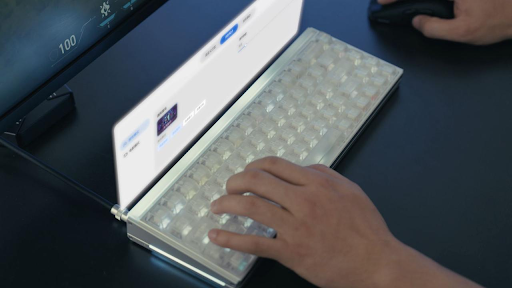
The next step is to create profiles. In HIVE 2.0, one setup can be tuned for shooters, another for everyday typing, and a third for experimenting with new games. Dynamic Keystroke can assign multiple actions to a single press, which is useful for advanced FPS control, while real-time game sync, AI lighting, and audio visualization make the setup feel more alive. This is the kind of flexible tuning that makes a keyboard feel like a Best Hall Effect keyboard 2026 contender, not just another fast board with big numbers.
Adjust the Feel You Hear, Not Just the Speed You See
Another advantage of this Melgeek product is that its structure is supported by the brand’s own keyboard patent, U.S. Patent No. US 11,435,834 B2. The patent focuses on a layered internal design using flexible sheets, guide structures, and vibration-control elements to improve key stability and reduce unwanted noise. Combined with the Made68 Ultra V2’s full aluminum alloy chassis, silicone gasket structure, and multi-layer damping, that patented foundation helps turn technical engineering into a quieter, steadier, and more comfortable gaming feel.
Finish With the Setup That Makes You Forget the Setup
After the angle, actuation, profiles, lighting, and sound are dialed in, the best keyboard should almost disappear under your hands. You stop thinking about settings and start trusting every input. For Melgeek, that is where performance becomes more than a feature list: the keyboard is not just a device that helps you react faster, but a personal space of control, confidence, and flow when the game gets intense.

