

Samsung, a global leader in the electronics industry, is redefining speed and performance in storage solutions with the 9100 PRO. Samsung has consistently pushed the boundaries of innovation with its cutting-edge products, and its 9100 PRO high-performance solid-state drive (SSD) is revolutionizing the storage landscape.
Let’s face it: content creators, video professionals, and tech enthusiasts are always looking for greater efficiency, faster load times, faster read and write speeds, and reliable storage solutions. The Samsung 9100 PRO offers blazing-fast read and write speeds, along with advanced features that enhance efficiency and durability. This SSD is designed to meet the demands of modern computing applications.
Unleashing unrivaled speed and performance with the 9100 PRO
Featuring the latest NVMe technology, the Samsung 9100 PRO offers lightning-fast data transfer speeds that significantly outperform traditional drives. With sequential read speeds of up to 14,700 MB/s and write speeds of up to 13,400 MB/s, the 9100 PRO delivers exceptional performance across a wide range of tasks, from intensive multitasking to data-intensive applications to even gaming, thanks to Gen5 technology.
Enjoy multitasking, AI Apps, and blazing-fast game loads with random read/write speeds up to 2,200K/2,600K, delivering input/output operations per second (IOPS) with no lag or performance issues.
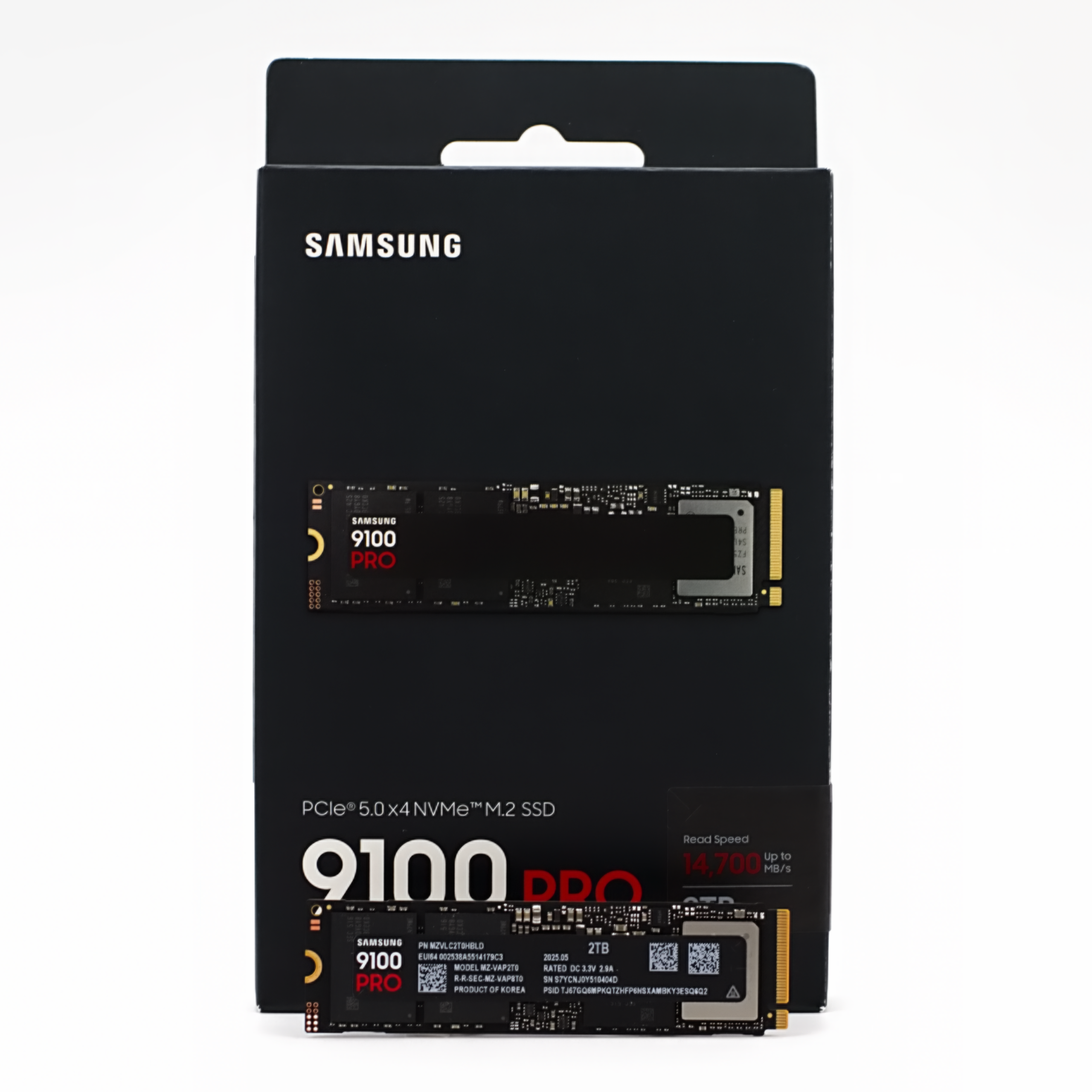
The 9100 does deliver, but is it worth it?
The 9100 PRO is available in 1TB (Terabyte), 2TB, 4TB, and 8TB options. A heatsink is also available, but at an extra cost. When they were first released, the price was much higher than it is now. Are they worth the asking price now? Well, that is a difficult question to answer, and it will differ for each user considering upgrading their drive.
Plain and simple, the Samsung 9100 PRO is a fantastic SSD. It has made a noticeable difference to my computing experience, and to date, it is the fastest drive I have tested. If you are looking for a blazing-fast M.2 drive for a mini PC, laptop, or desktop, this drive is worth considering.
The PCIe Gen 5.0 spec doubles the bandwidth of Gen 4, and Samsung is claiming up to 14,700 MB/s for sequential reads and up to 13,400 MB/s for sequential writes. But many users will be more interested in the input/output operations per second (IOPS) numbers, which Samsung says are up to 2,200K reads and 2,600K writes. But also keep in mind that this performance will vary depending on the SSD’s firmware, system hardware, system configuration, and other factors.
PCIe 3, 4, and 5
The Samsung 9100 PRO is also backward-compatible with PCIe 3 and 4 slots, but you will not get the speeds, so if you are planning to spend this much on an upgrade, you should get the maximum speeds with PCIe 5. So if your current setup doesn’t support Gen 5, it’s probably not worth upgrading.
Warranty and TBW
As for the warranty, all Samsung 9100 Pros have the same five-year warranty if the Terabytes Written (TBW) isn’t reached. The maximum terabytes written (TBW) warranty is based on the drive’s capacity, starting at 600 TBW for the 1 TB drive and doubling with each additional storage capacity.
9100 PRO benchmarks versus
With all of that out of the way, let’s do some benchmarks. In this review, we used CrystalDiskMark, the 3DMark Storage Benchmark (also on Steam), and Samsung’s Magician 9.0. We are testing the 9100 PRO, 2 TB version using Microsoft Windows 11 Pro, DirectX 12, AMD Ryzen 9 9950X3D 16-Core Processor, 64.0 GB CORSAIR Dominator Titanium RAM, NVIDIA GeForce RTX 4080 SUPER, on a GIGABYTE X870E AORUS Master AMD AM5 LGA 1718 Motherboard.
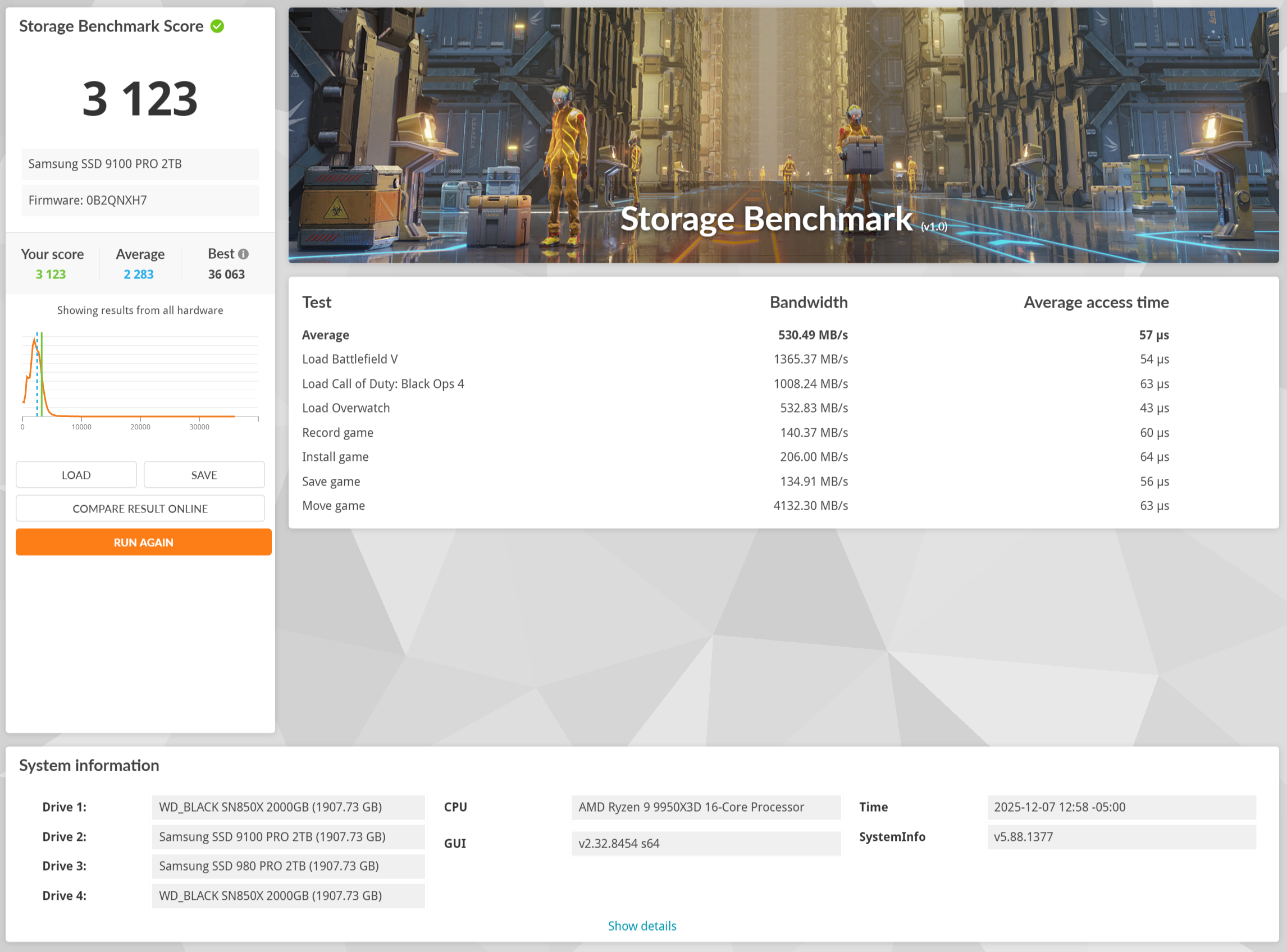
3DMark Storage benchmark
3DMark Storage benchmark uses traces recorded from popular games to measure real-world gaming performance, across its seven tests: load, record, install, save, and move game files. It is designed for gamers and is based on real gaming activities. It compares scores to find the best SSDs, and works with internal and external drives (a higher score means better performance).
In our first test using the 3DMARK Storage benchmark, the Western Digital SN850X 2TB (Drive 1 or C) averaged 502.54 MB/s, with a storage benchmark score of 2,745 (average 2,283).
The second test using the 3DMARK Storage benchmark, another Western Digital SN850X 2TB (Drive 4 or D), averaged 467.43 MB/s across its seven tests, with a storage benchmark score of 2,963.
In the third test, using the 3DMARK Storage benchmark, the Samsung SSD 980 PRO 2TB (Drive 3 or E) averaged 312.24 MB/s across its seven tests, with a storage benchmark score of 1,818.
In the final test, using the 3DMARK Storage benchmark, the Samsung 9100 PRO 2TB (Drive 2 or F) averaged 530.49 MB/s across its seven tests, with a storage benchmark score of 3,123.
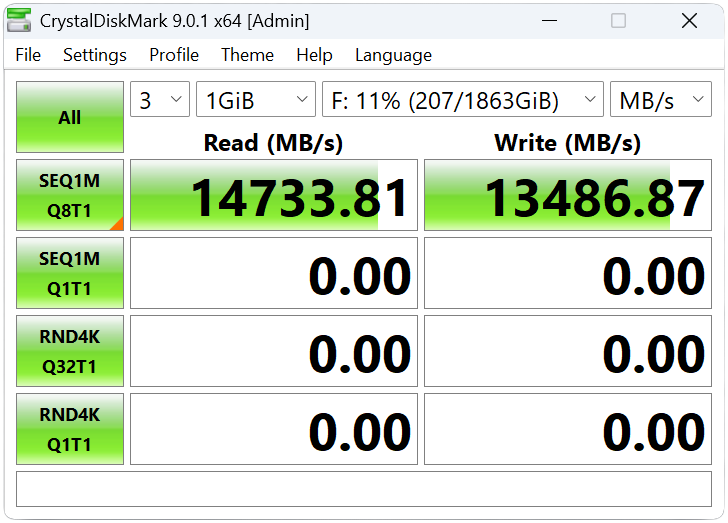
CrystalDiskMark
Now on to the CrystalDiskMark tests. CrystalDiskMark is a free, open-source disk benchmark tool for Windows that measures the read and write performance of storage devices. It measures both sequential (large, contiguous files) and random (small, scattered files) read/write speeds, to provide a comprehensive speed measurement for a device. “MB/s” means 1,000,000 bytes/sec.
First up was the Western Digital SN850X 2TB (C), which delivered 7,375 MB/s read and 6,311 MB/s write. Then the Samsung SSD 980 PRO 2TB (D) was next, delivering 6,844 MB/s read and 4,944 MB/s write. Then the Western Digital SN850X 2TB (E) delivered 6,301 MB/s read and 6,348 MB/s write. Finally, the star of the show, the Samsung 9100 PRO 2TB (F), delivered 14,733 MB/s read and 13,486 MB/s write.
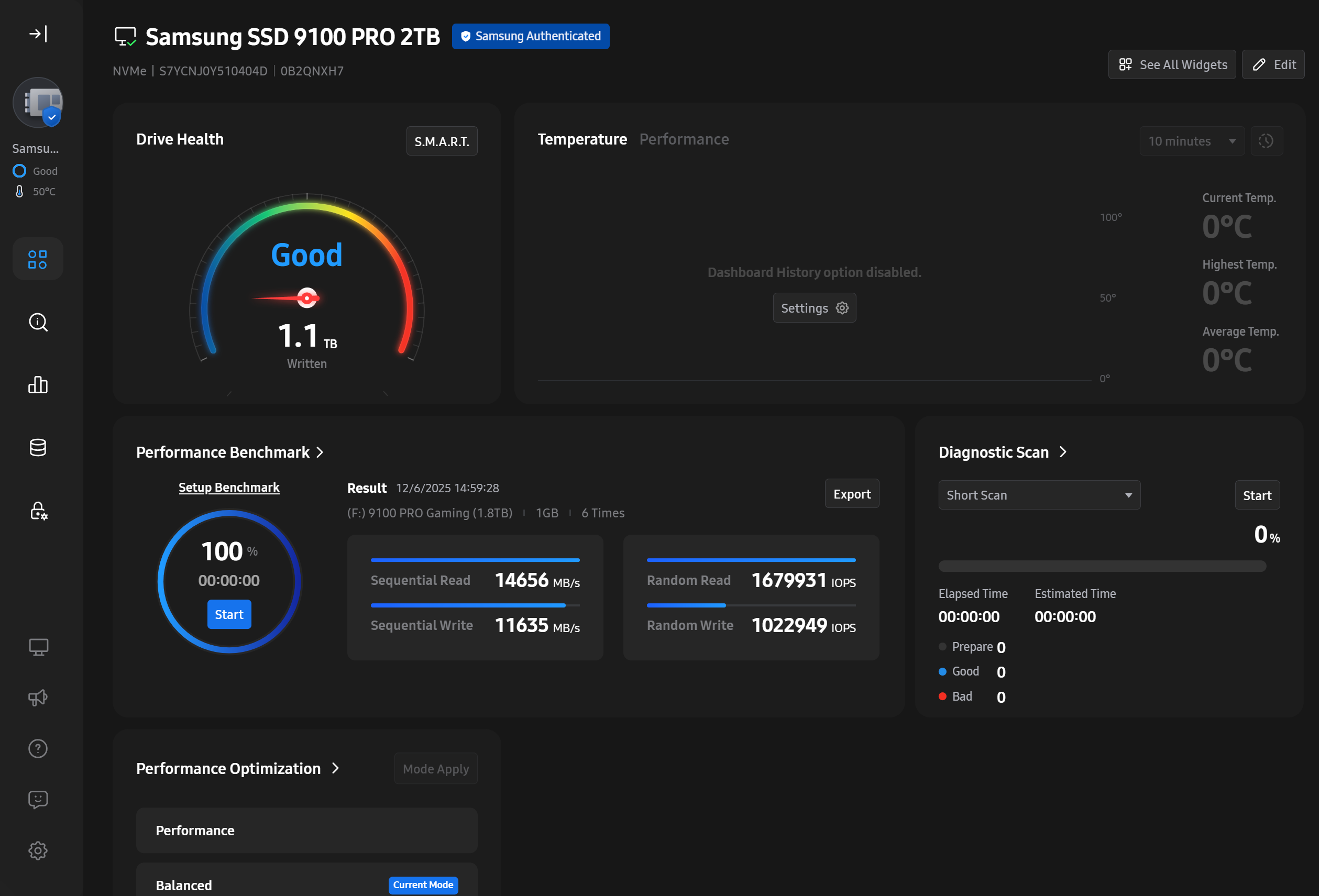
Magician 9.0
During the Magician tests, as expected, the 9100 PRO blew the others out of the water. In the performance benchmark, it delivered 14,656 MB/s read and 11,635 MB/s write. Far above the SN850X at 6,938 MB/s read and 5,192 MB/s write.
Final thoughts
We ran these tests multiple times on the same PC to check for any discrepancies. After a few runs, Samsung’s claim of 14,700 MB/s read and up to 13,400 MB/s write speeds was spot on for this system configuration. But also keep in mind that these results will vary by the SSD drive and PC configuration on which they are run.
In the past, I didn’t notice many differences between SSD upgrades, but with the 9100 PRO, I actually saw a difference when using it, and the test proved it.
Now that prices are a bit lower, the 9100 PRO should be considered an excellent upgrade option for professionals, hardcore gamers, and the average user. I know I’ll definitely replace some older drives with it in the near future.

